

Source :- LIVE HINDUSTAN
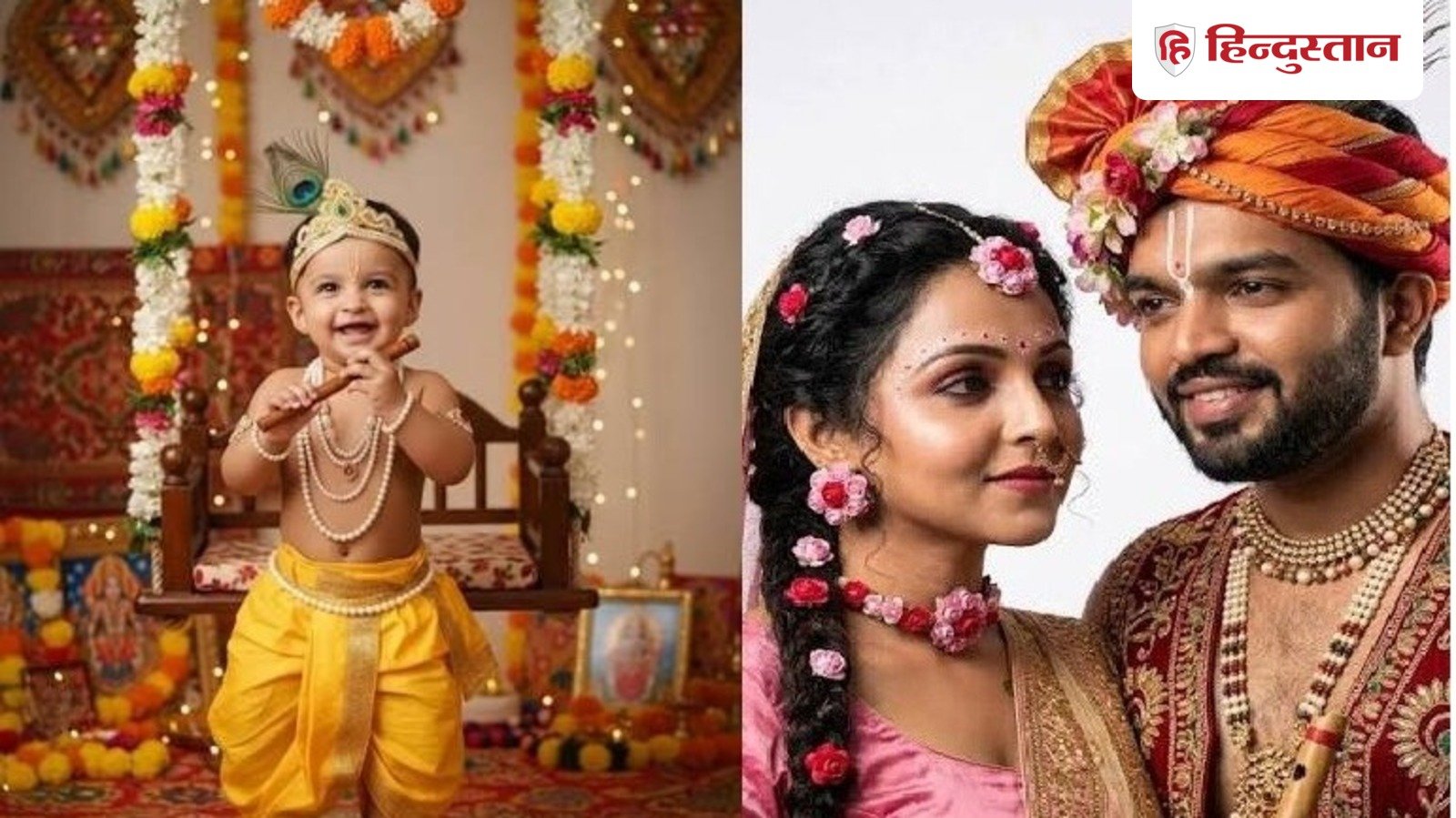
जन्माष्टमी 2026 पर अपनी और बच्चे की नॉर्मल फोटो को खास बनाएं। बच्चे की फोटो को नन्हे कान्हा और अपनी फोटो को राधा-कृष्णा लुक में बदलें। ये प्रोम्प्ट्स आएंगे आपके काम:
Happy Janmashtami 2026: जन्माष्टमी का त्योहार आज सिर्फ पूजा-पाठ और मंदिरों तक सीमित नहीं रह गया है। सोशल मीडिया पर भी लोग इस खास दिन को अपने अंदाज में सेलिब्रेट कर रहे हैं। लोग अपनी सामान्य तस्वीरों को जन्माष्टमी के खास अंदाज में बदलने के लिए चैटजीपीटी और जेमिनी जैसे एआई टूल्स का इस्तेमाल कर रहे हैं। खास बात यह है कि इसके लिए किसी प्रोफेशनल फोटोशूट या फोटो एडिटिंग सॉफ्टवेयर की जरूरत नहीं है। अगर आपके बच्चे की कोई प्यारी सी नॉर्मल फोटो फोन में पड़ी है, तो उसे एआई की मदद से नन्हे कान्हा के रूप में बदला जा सकता है। वहीं, अपनी कपल फोटो को राधा-कृष्ण की थीम में बदलकर जन्माष्टमी के लिए एक खूबसूरत तस्वीर तैयार की जा सकती है। इसके लिए आपको बस अपनी फोटो एआई टूल में अपलोड करनी है और नीचे दिए गए प्रॉम्प्ट को कॉपी करके पेस्ट करना है।
बच्चों की कृष्ण के रूप में तस्वीरें
अब इसके लिए बच्चे को तैयार करके फोटोशूट कराने की जरूरत नहीं है। एक अच्छी और साफ फोटो के साथ एआई टूल की मदद ली जा सकती है। बच्चे की ऐसी फोटो चुनें जिसमें चेहरा साफ दिखाई दे और फोटो बहुत ज्यादा धुंधली न हो। इसके बाद चैटजीपीटी या जेमिनी में फोटो अपलोड करें और नीचे दिया गया प्रॉम्प्ट कॉपी करके डालें।
Prompt 1: “Transform this child’s photo into an adorable Little Krishna-inspired Janmashtami portrait. Keep the child’s face, facial features, skin tone and natural expression recognisable. Add a traditional yellow dhoti, beautiful peacock feather crown, small jewellery and a flute. Place the child in a festive Vrindavan-inspired setting with flowers, diyas and a decorated matki filled with butter. Keep the image realistic, detailed and naturally lit.”
माखनचोर कान्हा वाला लुक भी कर सकते हैं ट्राई
अगर आपको बच्चे की तस्वीर थोड़ी शरारती और मजेदार चाहिए, तो माखनचोर कान्हा वाला अंदाज बेहतर रहेगा। इसमें बच्चे के पास मटकी और थोड़ा माखन दिखाया जा सकता है।
Prompt 2: “Turn this child into a cute Bal Krishna-inspired character sitting beside a decorated clay pot filled with butter. Keep the child’s face and identity recognisable. Add a yellow traditional dhoti, peacock feather crown, tiny jewellery and a playful smile. Create a beautiful festive background with flowers, diyas and warm golden lighting. Make the photo look natural and high-resolution.”
बांसुरी बजाते कान्हा का अंदाज
अगर आपका बच्चा थोड़ा बड़ा है और उसके पास खड़े होने या बैठने वाली फोटो है, तो बांसुरी वाला लुक भी काफी अच्छा लग सकता है। एआई को बांसुरी, मोरपंख, पीली पोशाक और वृंदावन जैसा बैकग्राउंड देने के लिए कहा जा सकता है।
Prompt 3: “Create a cinematic Janmashtami portrait using this child’s photo. Keep the child’s original facial features and natural skin texture. Dress the child in a traditional yellow dhoti with a peacock feather crown and flute. Show the child standing in a beautiful Vrindavan garden surrounded by flowers and soft greenery. Add warm evening light and a peaceful festive atmosphere.”
अपनी फोटो को बनाएं राधा रानी वाला लुक
अब बात उन लोगों की जो अपनी फोटो को राधा रानी से प्रेरित लुक देना चाहते हैं। सोशल मीडिया पर इस तरह के AI फोटो ट्रांसफॉर्मेशन का ट्रेंड भी देखने को मिल रहा है।
Prompt 4: Classic Radha Rani Look: “Transform this photo into a beautiful Radha Rani-inspired festive portrait. Keep the person’s facial features, face shape, skin tone and overall identity recognisable. Add a traditional pink and red lehenga, elegant jewellery, a beautiful dupatta and subtle floral accessories. Create a dreamy Vrindavan-inspired background with flowers, soft golden light and a peaceful devotional atmosphere. Make the image realistic and highly detailed.”
SOURCE : LIVE HINDUSTAN